How to delete your account
You can delete your PGI Cover account at any time using either of the methods below. Account deletion removes your personal profile and associated data as described in this page.
Option A: In the app (recommended)
This is the fastest way to delete your account.
- Open the PGI Cover app on your device.
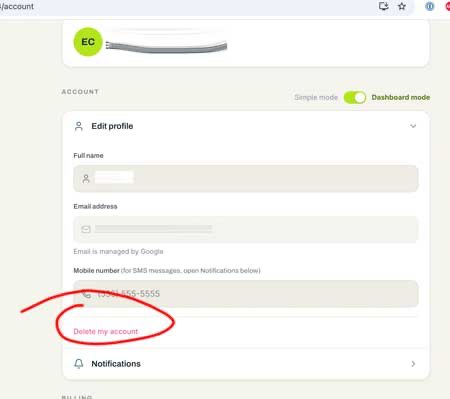
- Open your Account screen.
- Tap Edit Profile to expand it.
- At the bottom of the Edit Profile section, tap Delete my account.
- Confirm when prompted.
Option B: By email
If you cannot access the app, send a deletion request to [email protected] from the email address associated with your account. Include "Delete my account" in the subject line. We will confirm receipt and complete the deletion within 5 business days.
What we delete
When your account is deleted, we permanently remove the following data:
- Your user profile: name, email address, phone number, and password or authentication records.
- In-app messages between you and our underwriting team.
- Documents you uploaded, such as business plans and financial statements.
- Saved applications that were never bound to an insurance policy.
- Session data and device identifiers.
What we retain (and why)
Some records must be kept for legal and regulatory reasons, even after your account is deleted. This is standard practice for licensed insurers operating in Canada and the United States.
- Active and historical insurance policies: retained for the full policy term plus 7 years after expiry, as required by Canadian and US insurance regulators, including OSFI, provincial insurance acts, and state insurance codes.
- Claims records: retained for 7 years after claim closure to satisfy regulatory audit requirements.
- Financial transaction records (premiums paid, payouts received): retained for 7 years under applicable tax and accounting laws.
- Communications related to a bound policy or claim: retained alongside the policy record for the same period.
- Anonymized and aggregated analytics: may be retained indefinitely. This data contains no personally identifying information.
After deletion
- You will not be able to log in again using that email address.
- If you have an active insurance policy, your coverage continues after deletion. However, you will lose in-app access to your policy documents. Contact [email protected] for policy servicing, renewals, or claims while your policy remains active.
- You can create a new PGI Cover account at any time using a new or existing email address.
Questions
If you have any questions about account deletion or your data, contact our support team at [email protected]. We aim to respond within 2 business days.
For broader privacy questions, see our Privacy Policy.